

ZenSutra · VFX Pipeline practice
The smooth surface you modelled, deforming in Unreal every frame.
Subdiv Surface brings real-time Catmull-Clark subdivision to animated characters in Unreal Engine. Your cage skins and morphs as usual and the subdivision runs on the GPU on top of it — no exporting a dense mesh for every shot, and no drifting away from the surface the modeller approved.
Early access, v0.1 — Unreal Engine 5.7 and 5.8. Editor on Windows 64-bit; packaged games on Windows and Linux. Self-serve trials and checkout are still being built, so we issue trial keys by hand for now, usually the same working day.
Ship your game free. No distribution licence, no runtime fees, no royalties.
Cooking is the only licensed step
Creating a subdivided mesh needs a seat. Everything downstream of that — playing it, packaging it, selling it — does not.
Your render farm renders free
Farm nodes render cooked assets with no licence and no network check, so you are not buying seats for machines that never cook anything.
Pools bill what is cooking
Any number of artists can have the plugin installed. You pay for the seats cooking at the same time, not for headcount.
How it works
Cook once in the editor. Evaluate on the GPU every frame.
Step 1 · in the editor, once
Cook
Reads the mesh, cleans the cage, and precomputes the subdivision stencils, writing a
new _Subdiv asset beside the original. The
source is left alone.
Step 2 · every frame, on the GPU
Deform
Skin and morph the cage, apply the stencils level by level, compute the limit surface's normals and tangents, and hand the result to Unreal's renderer.
Capabilities
Everything below is shipped and tested.
Industry-standard Catmull-Clark
Built on OpenSubdiv — the same rules Maya, USD and RenderMan use — so the surface matches your DCC's smooth preview rather than approximating it. Results match OpenSubdiv exactly, including along semi-sharp creases.
Deformed on the GPU, every frame
Skinning and morph targets apply to the low-poly cage, then subdivision runs on the GPU. The smooth surface follows the animation with shading normals and tangents taken from the true limit surface, not averaged from dense triangles.
True to your model
Unreal's FBX import always triangulates. Subdiv Surface puts your faces back exactly as authored — quads, n-gons, edge flow — read from the source FBX/OBJ or carried by the Maya exporter. On Epic's SkinBasic character that is 3,148 of 3,148 faces exact, against 66.6% for guessing quads from triangle pairs. No FBX needs to be kept around.
Switch levels without re-cooking
Each subdivision level is an ordinary LOD — cage, level 1, level 2. Viewport and final render can sit on different levels, and changing your mind costs nothing.
Everything Unreal already does keeps working
The output is a normal skeletal mesh, so materials, temporal anti-aliasing and Movie Render Queue behave as they do for any mesh. Ray-traced shadows come from the subdivided surface rather than the cage, and motion blur uses the smooth surface's real per-vertex motion.
Path tracing and physics
Unreal's path tracer renders the subdivided surface, re-subdivided every frame as it animates, with its shadows. A subdivided character keeps its Physics Asset, so ragdolls, per-bone collision and traces work and the smooth surface follows the simulated bones. Subdivided static meshes keep their collision.
Creases, corners and locked vertices
Semi-sharp and sharp edge creases and corners, with exact shading along semi-sharp creases, plus vertices locked where you put them. Set them in Unreal, bring them across from Maya, or crease hard edges automatically above an angle threshold.
Static meshes, with optional Nanite
Right-click a Static Mesh and every level bakes into a real LOD with exact smooth-surface normals — nothing runs at runtime, so it costs no more than any static mesh. Or tick Nanite and the finest level becomes a single Nanite mesh. Materials keep their slots, and collision uses the cage so it stays cheap.
Detail where it shows, per material
Give each material slot its own level — the body at 3, the teeth at 1 — and the regions join without cracks, because the exact smooth surface is tessellated and stitched. Per-material and per-UV-channel rules let lightmap UVs stay straight while colour UVs smooth. Vertex colours subdivide with the surface.
Alembic caches too
Right-click a Geometry Cache and every frame bakes at the level you choose, with exact smooth-surface normals. For constant-topology caches — characters, cloth.
Immediate feedback
The Subdiv Creases tool shows the smooth surface live as you crease. A derived mesh that goes out of date — a re-import, new creases, new settings — is flagged with a one-click Re-cook, or re-cooked for you. Each level shows its face count and the estimated cook time on your machine before you commit, and a progress window tracks the cook.
Free at runtime, and offline
Only cooking needs a licence. Cooked assets play in the editor and in packaged games with no licence and no network check at all. The editor checks its licence on start and every six hours; offline it keeps cooking for three days.
Tools
What you actually get in the editor.
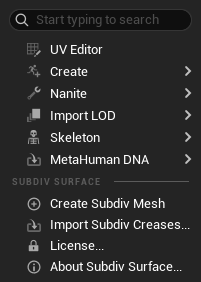
Create Subdiv Mesh
Content Browser · right-click any skeletal or static mesh
One click cooks a new _Subdiv asset next to the original, which is never changed. Every subdivision level becomes a LOD, so you can switch levels live with no re-cook. Split vertices are welded and your original faces restored from the source file.
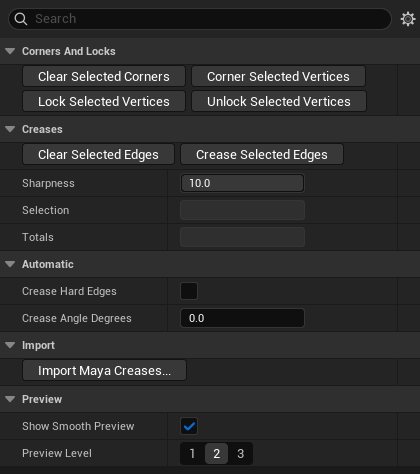
Subdiv Creases
Skeletal Mesh Editor · Editing Tools > Subdiv (static meshes: Modeling Mode > Subdiv)
Select quad edges and vertices — Shift to add, Ctrl to remove, drag to marquee — then set Sharpness from 0 to 10, where 10 is infinitely sharp and fractions are semi-sharp. Crease and Corner buttons with matching Clear, plus Lock and Unlock. A colour overlay shows creases yellow through red, corners orange, locks blue, and the smooth surface updates live as you work.
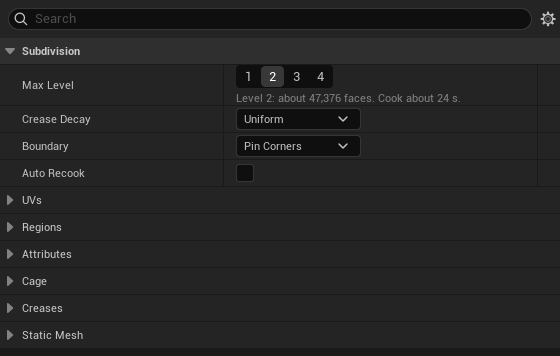
Cook settings
Shown when you create or re-cook a mesh
Pick the subdivision level with the face count and the estimated cook time for your machine next to each one, set per-material levels and UV rules, and choose whether an out-of-date mesh re-cooks itself.
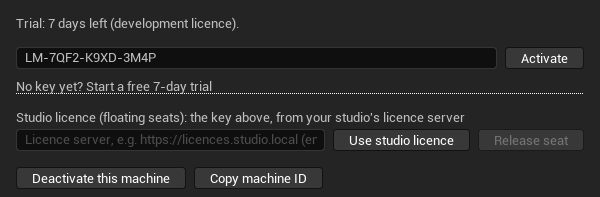
License window
Tools > Subdiv Surface > License
Shows licence status, takes a key and activates it, and starts a trial. Deactivate this machine releases a seat so you can move it, and Copy machine ID gives support what it needs.
Maya crease exporter
Ships inside the plugin · Extras/Maya/subdiv_creases.py
Adds Subdiv Surface > Export Subdiv Creases to Maya's menu. Edge creases, vertex creases and anything in a subdivLock set are written to a .subdiv.json file beside the FBX, and Unreal picks it up automatically on the first cook — axis and scale auto-detected, mirrored characters never flipped. Unreal's own FBX import drops creases; this is how they survive the trip.
Pricing
Same software in every tier.
Tiers differ in who may buy, what support you get, and how seats move — not in what the plugin does. Per seat, in USD. Every plan starts with the same 7-day trial, and shipping games and rendering on farm nodes are free on all of them.
Indie
Individuals, and companies under US$1M yearly revenue.
- Monthly
- $12
- Annual
- $99
- Perpetual
- $249
Email support. One machine per seat — move it by deactivating the old machine.
Request a trialStudio
Any company size. No limits on which projects cooked assets go into.
- Monthly
- $39
- Annual
- $349
- Perpetual
- $799
Priority support, including moving a seat to a new machine beyond the self-service allowance. One machine per seat.
Request a trialStudio pool
Floating seats · per concurrent seat, per year
Seats shared across the studio, on our licence server or your own. A seat is taken on the first cook and given back when the artist stops. Any number of artists; at most N cooking at once. Annual only, and sold through a conversation until checkout handles pools.
5 to 24 seats
minimum 5
$449
25 to 99 seats
$349
100 seats or more
$199
Enterprise
On request: a site licence on your own licence server, an SLA, invoicing and custom terms.
Education
Free for students and teachers, for non-commercial use.
Subscriptions renew. If one lapses you stop cooking new meshes; everything already cooked keeps working.
Perpetual includes 12 months of updates. Any version released inside those 12 months keeps working for ever; newer versions need a renewal.
Early-access customers keep their price. If you bought at the first early-access rates, they hold for as long as you keep renewing.
Downloads & install
Two editions, one per plan.
Every zip holds the Windows editor plugin — there is no separate Linux download. Which edition you get depends on your plan, and it arrives with your trial key or your purchase. The SHA-256 values below are published here so you can check the file you were sent against the official page.
Binary runtime
Trial · Indie · Education
The Windows editor plugin, plus the game runtime precompiled for Windows and Linux games in Development, Shipping and DebugGame.
Builds for: Packaged games: Windows 64-bit and Linux; Visual Studio 2022 17.14 or newer. Other platforms (consoles, Windows on ARM): Studio plan.
SubdivSurface-0.1.0-unsigned-UE5.7-Win64-binary-runtime.zip
3.9 MB
SHA-256 c66789b8e419fced28587acf4818758f1cc1cefb56720e5f4d0a09e48c655ca8
SubdivSurface-0.1.0-unsigned-UE5.8-Win64-binary-runtime.zip
3.9 MB
SHA-256 01c33aff3d1292e3ee04652cb4ae6cc36e539feb4743005a1adfb1e6f1973810
Runtime source
Studio · Studio pool · Enterprise
The Windows editor plugin, plus the runtime's source, so you can build it for any platform and configuration your project targets.
Builds for: Any platform your project already builds for, including consoles and Windows on ARM.
SubdivSurface-0.1.0-unsigned-UE5.7-Win64.zip
2.3 MB
SHA-256 6110bca04c91e40b1e727fa39f221d03a6e435498aab031ca06be8c154c8a3eb
SubdivSurface-0.1.0-unsigned-UE5.8-Win64.zip
2.3 MB
SHA-256 0210eb481e377d58e83d0fd058e06a14b4e728cde4e0835672de2769b6d74118
Early access — not code-signed yet
- Right-click the zip, Properties, tick Unblock, OK — before you unzip it.
- On PCs with Smart App Control switched on, Windows may refuse to load the plugin. Use another machine, or wait for the signed release.
- Signed builds replace these under the same version number, so testers only need to re-download — nothing else changes.
Installing
- Download the plugin for your Unreal version — 5.7 or 5.8 — in the edition for your plan.
- Early access only: right-click the zip, Properties, tick Unblock, OK.
- Unzip into your project's Plugins folder, or the engine's Plugins/Marketplace.
- Open the project, Edit > Plugins, enable Subdiv Surface — it starts disabled — then restart the editor.
- Tools > Subdiv Surface > License, paste the key, Activate.
- Right-click a skeletal mesh > Create Subdiv Mesh.
Requirements
Before you install.
- Unreal Engine 5.7 or 5.8. Editor on Windows 64-bit; packaged games on Windows 64-bit and Linux.
- A DirectX 12 GPU.
- For ray-traced shadows, a ray-tracing GPU and a project on SM6 with ray tracing enabled. Epic's default templates are; older SM5 projects silently disable it.
- The engine's Deformer Graph plugin — ours enables it for you.
- Materials need Used with Mesh Deformer on 5.8, or Used with Skeletal Mesh on 5.7. The cook warns you when one is missing.
- Nanite applies to subdivided static meshes only. Skinned meshes cannot use Nanite — an engine limit that applies to every mesh deformer, not just ours.
Coming next
Not built yet.
Listed here rather than above, because they are not shipping:
- The editor on Linux, for cooking on Linux workstations. Packaged games already run on Linux today.
- Cloth assets carried across to subdivided characters.
Licensing runs on ULM, our own licensing platform — which is also why a studio can host its own seat pool instead of depending on ours.
Questions we get
The short answers.
Does my packaged game need a licence?
No. Only cooking — creating the subdivided asset — is licensed. Ship the game in any number of copies with no distribution licence, no runtime fee and no royalty.
What happens when the trial ends?
You can no longer cook new subdivided meshes. Everything you already cooked keeps working.
Does it phone home?
The editor checks its licence when it starts and every six hours. Offline, it keeps cooking for three days. Playback never checks at all.
Is it code-signed?
Not yet. Early-access builds are unsigned, and signed builds follow. Every download has a published SHA-256 so you can verify the file you were sent.
Is my source mesh changed?
No. Subdiv Surface writes a new asset next to it.
Can I try it on more than one machine?
A trial is for one machine, and each machine can have one trial. If the plugin says a machine has already had one and you think that's a mistake — a second-hand PC, say — tell us.
How many people at one company can try it?
Up to three trials per company. Trials from personal email addresses — Gmail, Outlook and so on — count individually. If your company has used its three and someone else needs to evaluate it, tell us.
Want to try it on your own character?
Tell us your engine version and how your characters come out of Maya, Houdini or Blender. We'll send a trial key and the build for your engine — and tell you straight if your setup isn't supported yet.